What Is a Video Alpha Channel?
Last updated: · Written by the RenderAlpha team
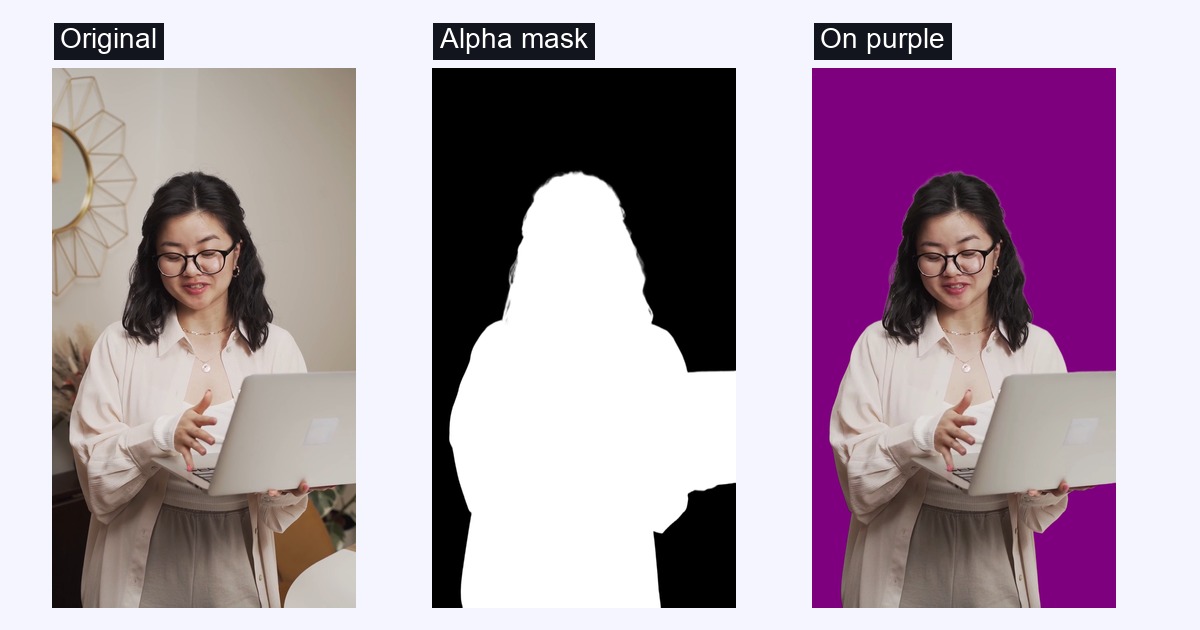
A presenter can have dark hair and still sit on an empty background. A white shirt can remain fully visible while the room disappears. Color alone does not tell the player which parts to show. This guide separates the picture from its transparency information using one real video frame.
Short answer
A video alpha channel records how opaque each part of the picture is. It is separate information from the visible colors. In our 8-bit example, alpha 0 hides the foreground, 255 keeps it fully visible, and 128 makes it about half opaque. A grayscale view of that information is called a matte: black means transparent, white means opaque, and gray means partially visible.
Watch the picture and its alpha mask together
The top-left panel is a five-second camera clip. Beside it is the alpha extracted from the processed WebM. The bottom panels put the same foreground over white and purple. All four share the same timing, so you can follow a hand movement from the original to the mask and the finished composite.
White inside the mask does not mean the person becomes white. It means keep the foreground there. Black around the silhouette means let the new background show through. The laptop is white in the mask too: the model retained it with the person. A mask describes what stays, not necessarily what you wanted to keep.
To inspect your own file rather than this example, open the transparent video checker. It reads WebM metadata and sampled decoded pixels locally, and keeps the two results separate.
Read three actual pixels from the same frame
At exactly 1.00 seconds, we decoded the 720×1280 WebM and read three locations. Coordinates start at the top-left corner of the unscaled frame. The image numbers match the table, so the explanation also works without reading small labels.
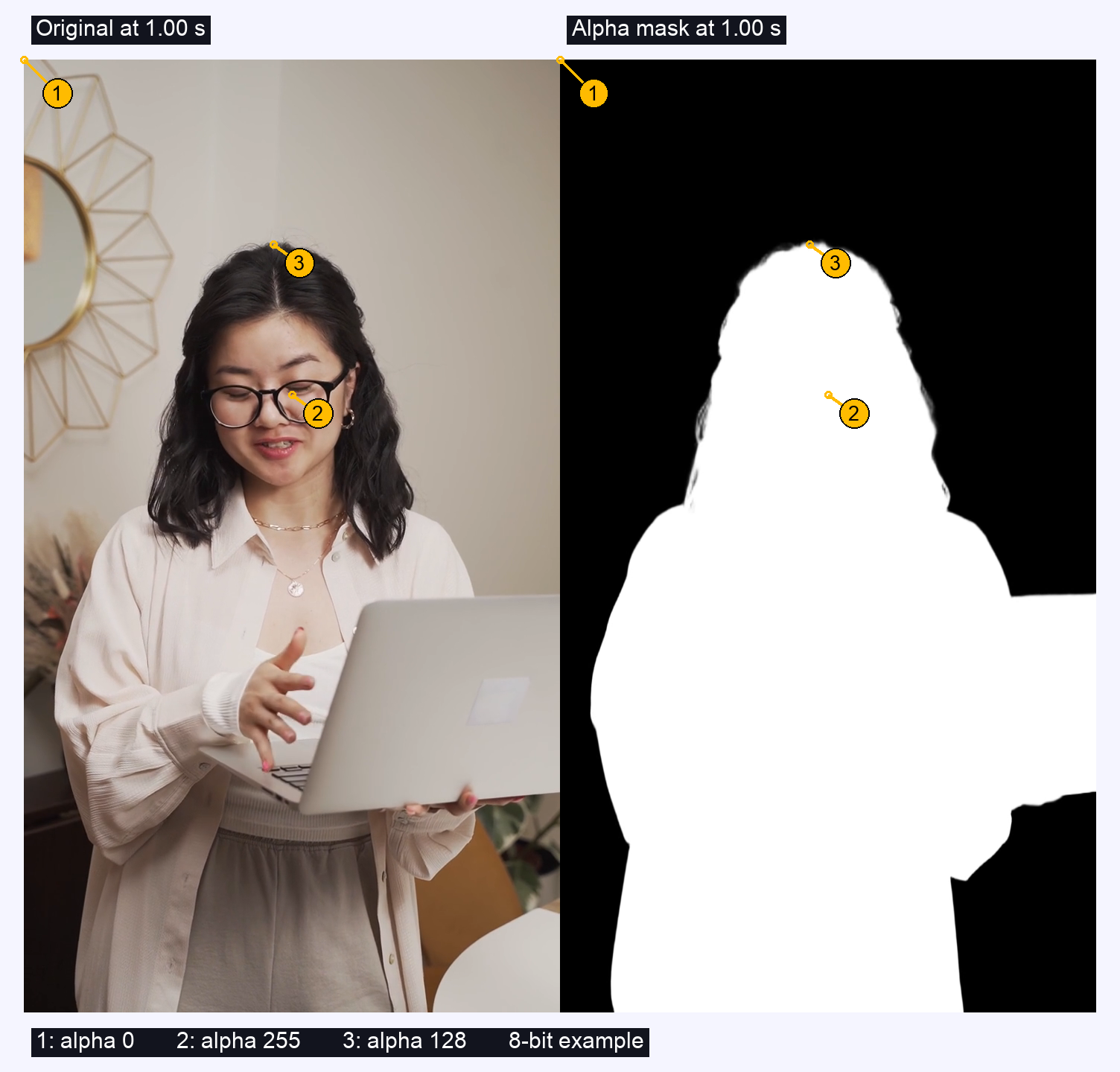
| Marker | Source coordinate (x, y) | Alpha | What it means |
|---|---|---|---|
| 1 | (0, 0) | 0 | The foreground contributes nothing here; the new background is visible. |
| 2 | (360, 450) | 255 | The foreground remains opaque here, regardless of its visible color. |
| 3 | (335, 248) | 128 | About 50% opacity at this edge pixel, not a gray patch painted onto the person. |
Why a hair edge contains gray values
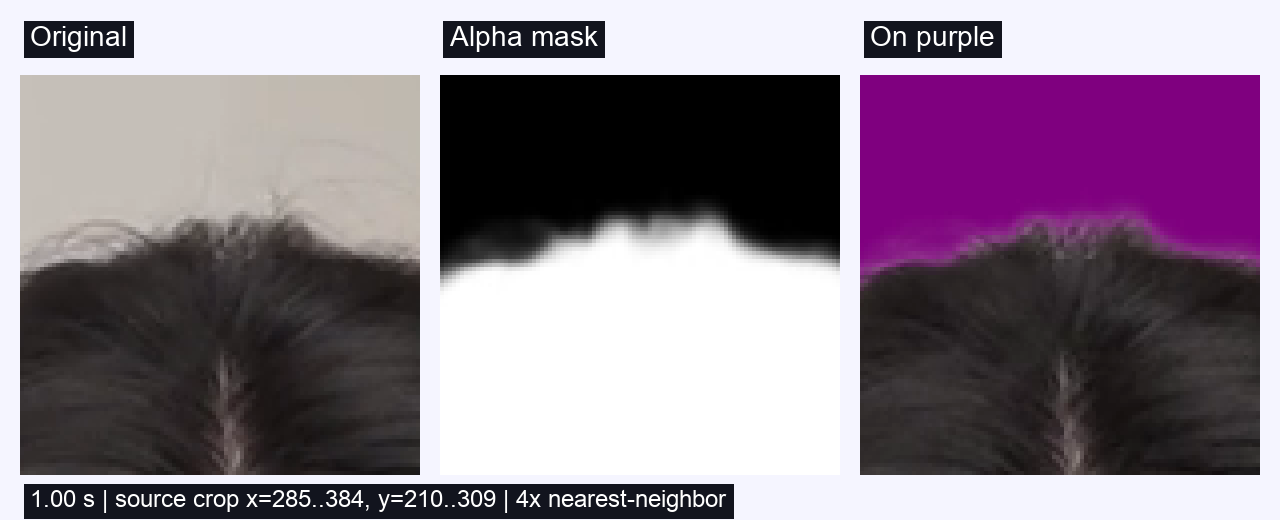
Our frame has 444,392 pixels at alpha 0, 458,245 at 255, and 18,963 between them. Those counts describe this decoded mask only. They are not a quality score, and more gray pixels would not prove a better cutout.
The enlargement below includes marker 3 at the top of the hair. The gray transition lets the foreground and purple background contribute together instead of switching abruptly between them. We enlarged the same 100×100 crop four times with nearest-neighbor scaling to expose its pixels, without sharpening or repairing the mask.
This is a model-generated matte, not a measurement of the physical transparency of each hair. A soft value may reflect a boundary estimate or mixed source pixels; it does not establish that every strand was recovered correctly.
A black background and a black matte are different
Black in the color picture is a color. Black in the grayscale matte represents zero opacity. A screenshot of a black-backed player cannot tell you which one you are seeing. Our raw alpha mask at 1 second shows the transparency information directly, while the video above shows how it affects two backgrounds.
The 0–255 scale belongs to this 8-bit example. MDN also illustrates alpha on a normalized 0–1 scale. Read the range before interpreting a number: 128 in this example means 128 out of 255. Also, explaining color and alpha separately does not mean every video stores four literal R, G, B and A planes in that arrangement.
Where green screens and background removal fit
A green screen gives a keyer a color to separate; the green itself is not alpha data. Automatic background removal estimates a foreground mask instead. In both workflows, you still need to preserve transparency in the output if you want to reuse the cutout over another scene.
This page does not compare those methods. Use the green-screen workflow for keying, or the ordinary-footage case study to inspect what our existing cutouts kept and missed.
Choose the next step for your project
To make a delivery file, follow creating a transparent WebM. To preserve transparency during export, use the alpha export guide. To choose a format, read the format comparison. If a file is unexpectedly opaque, use the transparency troubleshooting guide. Those pages handle the commands and compatibility details rather than repeating them here.
How this example was made
The source is ANTONI SHKRABA production footage from Pexels, originally published May 30, 2021. We use seconds 3–8, resized to 720×1280 at 25 fps. The transparent result was generated for our November 14, 2026 case study. We reused that file on November 15 without another model request.
FFmpeg 9.0.2 decoded VP9 with libvpx-vp9 and extracted alpha with alphaextract. We inspected frame 25, counting from zero: 1.00 seconds in this 25 fps clip. The original and mask keep matching coordinates; compositing uses that mask without inversion, thresholding or edge repair. This explanation does not test editor compatibility, compare models or prove segmentation accuracy.
Frequently asked questions
Does a black background mean the file has no alpha?
Not by itself. The color image may contain black pixels, or a player may be showing a black backing behind transparent areas. Inspecting the mask separates those two situations.
Is a green screen the same thing as an alpha channel?
No. The screen is part of the recorded scene. Alpha is opacity information created or preserved during processing. Our original room had no green screen, yet the processed file has the mask shown above.
Can renaming a normal video create transparency?
Renaming changes the filename, not the opacity information in the picture. You need a source with transparency, or a process that separates the foreground, before an appropriate export can preserve it.
Does gray in the alpha mask indicate an error?
Gray can be intentional partial opacity, as marker 3 demonstrates. Whether it belongs at a particular edge depends on the source and the desired composition; the presence of gray alone proves neither success nor failure.
Sources
Primary sources we checked. The date is when we last opened each page.
- MDN: Alpha (alpha channel): opacity, color information and normalized alpha examples (Retrieved )
- FFmpeg Filters: alphaextract: extracting the alpha component as a grayscale video (Retrieved )
- Pexels: original footage by ANTONI SHKRABA production: downloaded November 14, 2026; original seconds 3–8 reused for this explanation (Retrieved )
- Pexels License: modified website examples; the person shown does not endorse this product (Retrieved )